Specto+

Network defense platform

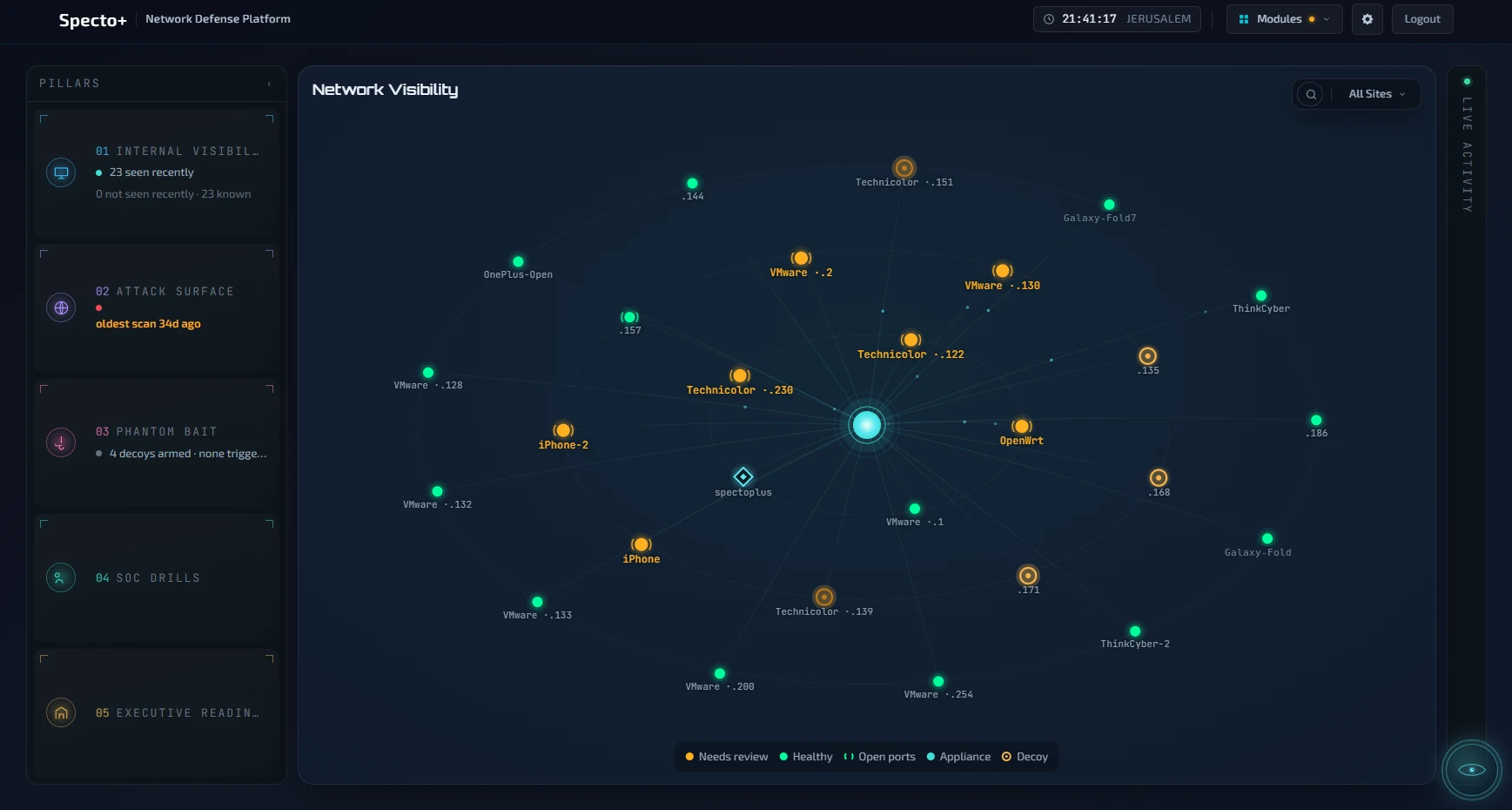
The Specto+ network view: every device the appliance found on a real network, colour-coded by state

X-ray vision
for the person
in charge.

You are accountable for a network you cannot see. One machine, switched on inside it, and the picture comes back: what is there, what a stranger can reach from outside, and where the picture is thin.

ThinkCyberthinkcybergroup.com

Specto+ · Network defense platform

X-ray visionfor the person in charge.

You are accountable for a network you cannot see. Specto+ is one machine you switch on inside it — it finds every device it can reach, tells you which of them it actually checked, and shows you what a stranger can see of you from outside.

The Specto+ network view: every device on a real network, colour-coded by state

One · free, on every device

What is on your network — and what was actually checked

It sweeps the network and asks every device it can reach what it is running. Nothing is installed on any of them.

Then it does the thing almost nothing else does. A machine it scanned that had nothing open says “scanned, and nothing was listening — this is a result, not a gap”. A machine it could not reach says that instead, and is never shown to you as clean.

Findings are split the same way. Proven means the exact version a machine announced falls inside the affected range of a published vulnerability. That is a proven version match, not proof the machine can be exploited — a backported fix or a configuration can change the answer, so a person confirms before you act. A rough guess is never counted as proven.

Why this matters more than a short list

A report that says nothing was found lets you assume it looked everywhere. You find out it did not when something happens in the part it never reached.

“No problems found” can mean nobody looked.

One · What is on your network
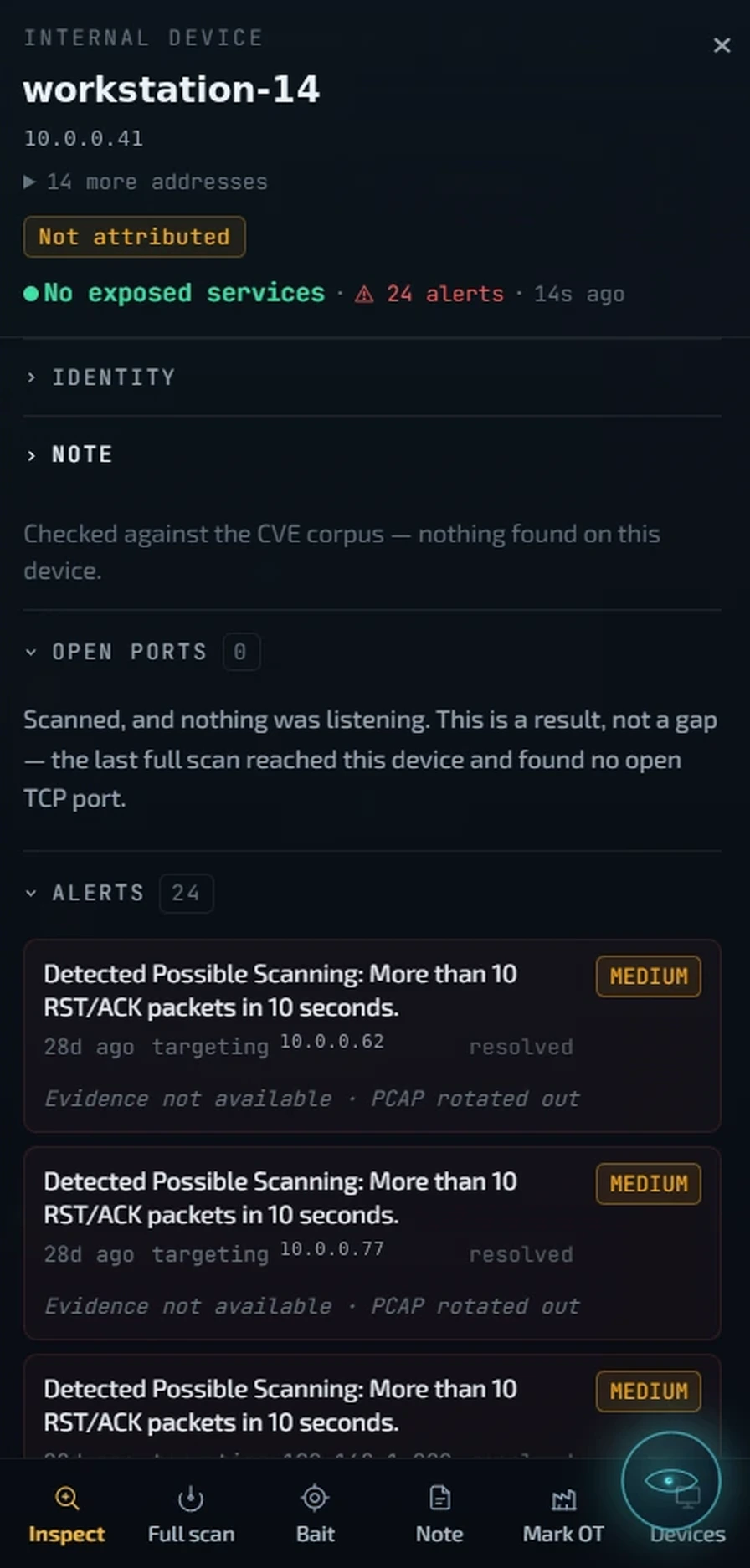
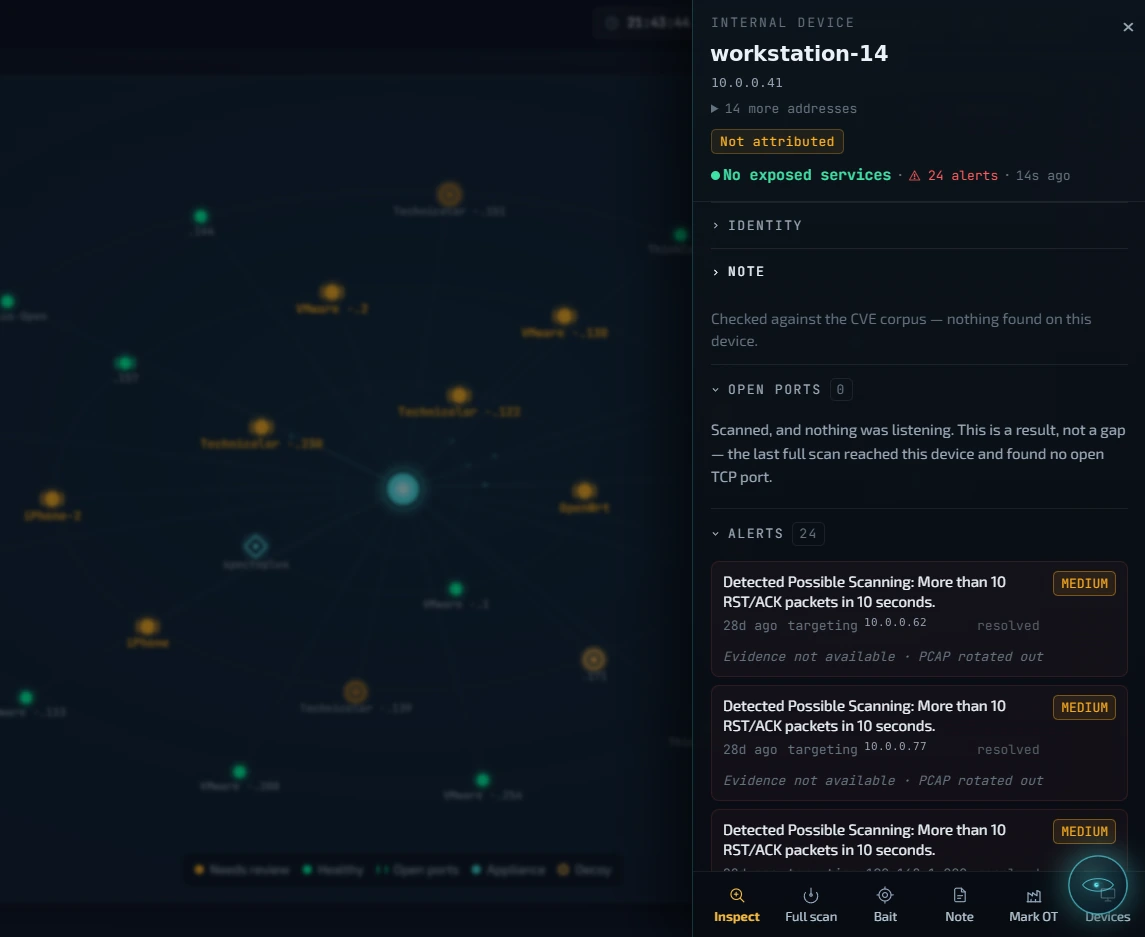
The Specto+ device panel: workstation-14, no exposed services, and the open-ports finding that reads scanned and nothing was listening, this is a result not a gap
The Specto+ device panel: scanned and nothing was listening, this is a result not a gap, with the device's alerts
Which of the three it is · scanned and quiet, needs a person, or not looked at

Two · needs activation

Machines nobody has any business touching

Specto+ puts decoys on your network. Each gets its own address and network identity, so to every other computer it looks like a separate machine rather than part of Specto+. Nothing is installed anywhere else.

A decoy has no legitimate users. You list your own scanners and inventory tools as expected sources, and everything else that touches one is worth your attention — with the packets kept as evidence of what it did.

Monday morning

One red line. A laptop in accounts touched the fake file server on Saturday at 02:14. You click it: which laptop, when, and exactly what it sent.

“Nobody in accounts works Saturdays. And nobody knows that server exists.”

A decoy contact appears on the dashboard. It does not send an email or ring a phone. Decoys work on the network the appliance sits on.

Two · Machines nobody has any business touching
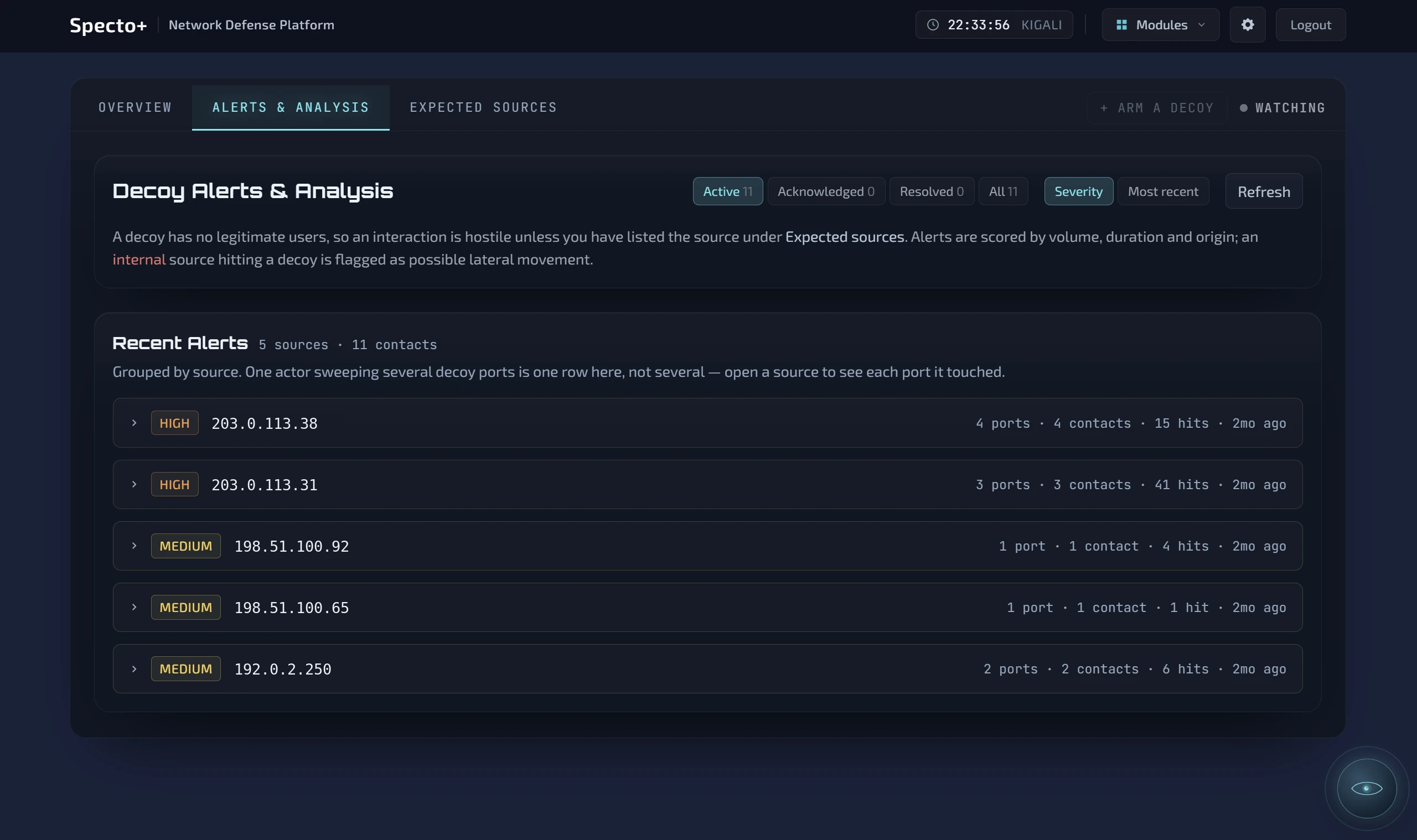
The Specto+ decoy alerts screen: sources that touched a decoy, grouped, with how many ports and contacts each
Everything that touched a decoy, grouped by source · from the public box we run ourselves

Three · needs activation

What a stranger can find out about you

Point it at the domains and addresses that are yours and it looks from the outside — from the appliance, out through your own connection — using only what you publish or what your public services answer to anyone who asks. Not from inside, where everything looks reachable.

It reads the mail records you publish and tells you whether they are set to stop someone sending mail in your name — and whether you are asking receiving servers to reject that mail or merely to note it. Plenty of organizations find out here that they have been asking for a note.

It finds what you left reachable — forgotten repositories, environment files, old backups — and keeps the real response as evidence. It never runs exploits. Login-page checks run only if you switch them on, and it tells you exactly what it sent.

In the board meeting

Somebody asks whether you are exposed to the thing that was in the news.

“Two machines match, and we have confirmed both. Patched by Thursday. Eleven we could not check, and here is why.”

Three · What a stranger can find out about you
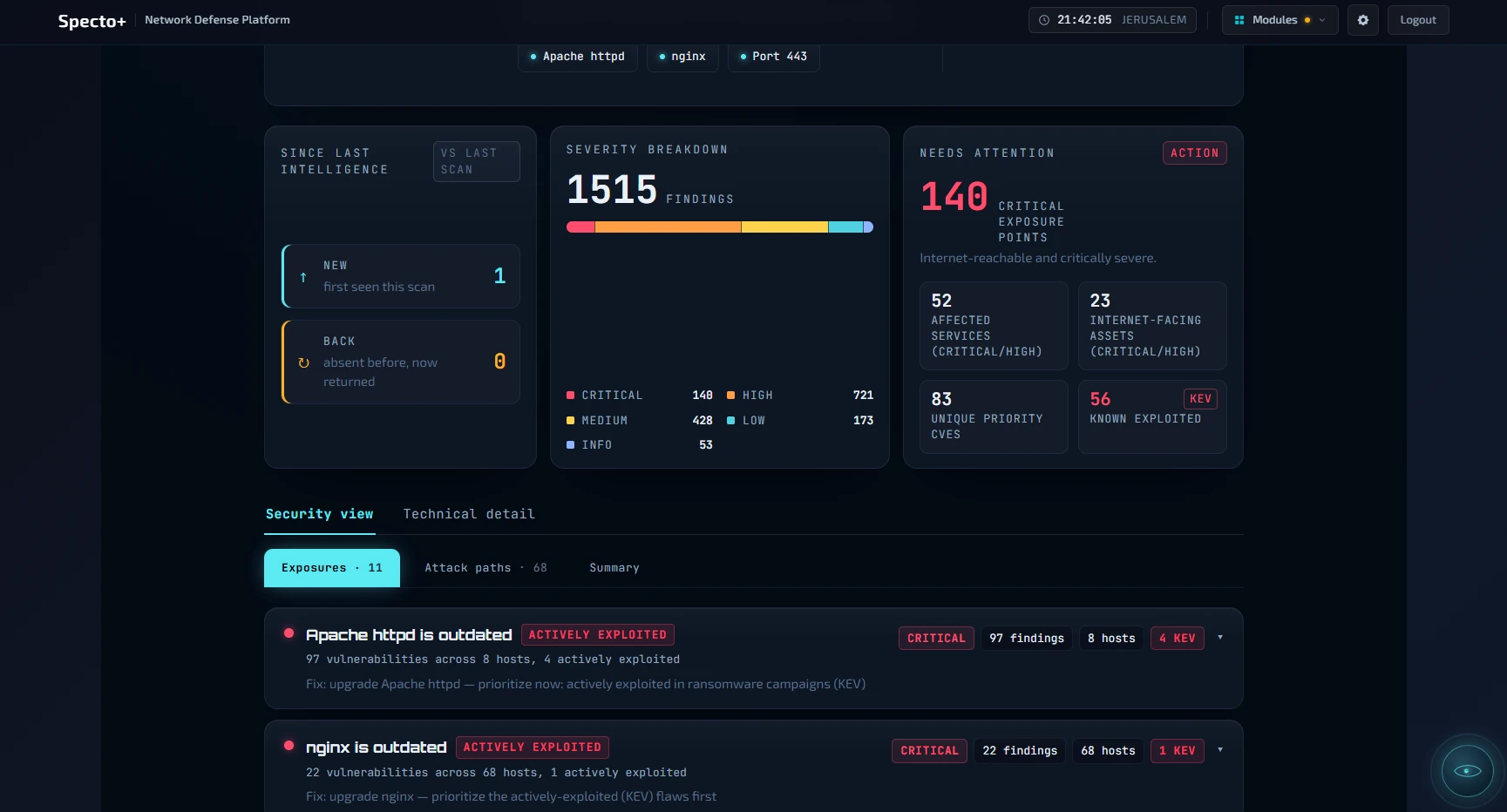
A Specto+ attack surface result: severity breakdown, critical exposure points, known-exploited count, and named exposures with fixes
Proven, needs a person, or not checked · known-exploited ones flagged

And if your policy forbids the cloud

The AI can run inside your building

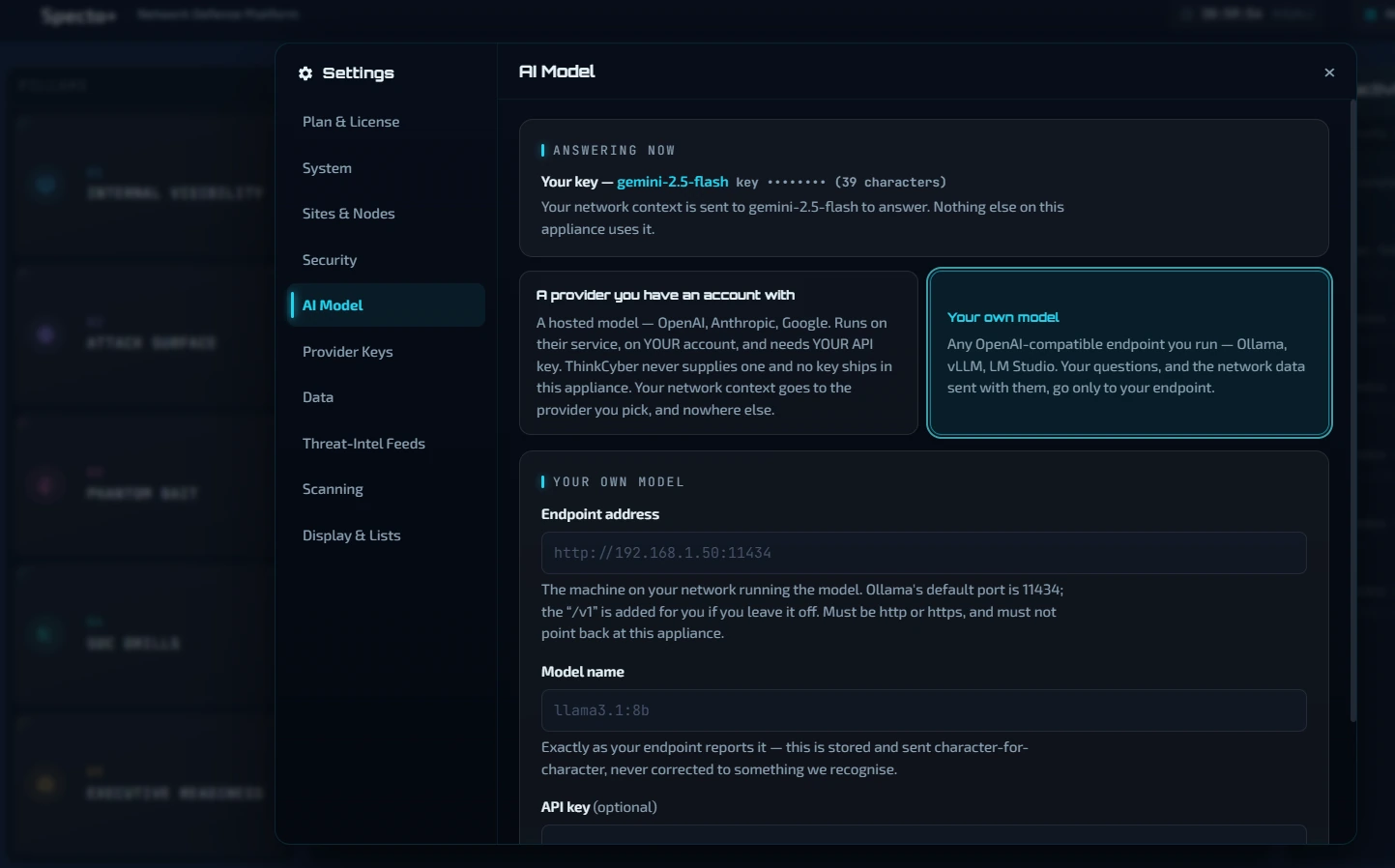
Cy answers questions about your network in plain language. It uses whichever model you point it at and has no other destination. Point it at a model on a machine down the hall and nothing about your network leaves the building. Point it at a provider you already have an account with and the context goes to them, on your account, with your key. Running your own model needs a paid licence.

Cy needs a model — yours or a provider’s. With neither, it is off. And this is about Cy alone: the external scan reaches out by its nature, and the optional intelligence lookups send your public addresses to whichever of those services you switch on. See the full list of what leaves the network.

Four · The AI can run inside your building
The Specto+ AI model settings: a hosted provider on your own account and your own key, or your own model on any endpoint you run
The choice, on one screen · no key of ours ships in the software and there is no default
What is free, and what is not

Every device, free and permanent

Free forever: finding what is on your network, what each device is running, and which of them were actually checked. Every device, no limit. No sign-up, no email address, no license code, no trial clock.

Free includes Cy, with your own cloud AI key. A paid licence adds the outside view, the decoy, the exercises and Endpoint Control, and lets Cy use a model you run yourself. It is a yearly licence per box (one box per network), never per device. Try every paid module free for 30 days. To buy, we connect you with your local partner.

You tell it which parts of the network to leave alone — the factory floor, the medical equipment, the controller nobody is allowed to touch. It will not probe them, and it lists them as not assessed rather than counting them as fine.

What it needs, in full
Runs on
A virtual machine on hardware you own.
Network
A bridged adapter onto the network it watches — not NAT.
For decoys
The hypervisor must let that adapter use extra hardware addresses.
Mirror port
Optional. Without one, intrusion alerts see only the traffic that reaches the appliance.
Reaches out to
Three public feeds on a schedule — the vulnerability catalog every two hours, the known-exploited list every six, the product dictionary weekly. Nothing else unless you configure it.
Sizing
Comes with the build, measured against your network.

Request a 30-day trial Download this as a PDF
Specto+ · ThinkCyber thinkcybergroup.com
Specto+ · ThinkCyber